Export
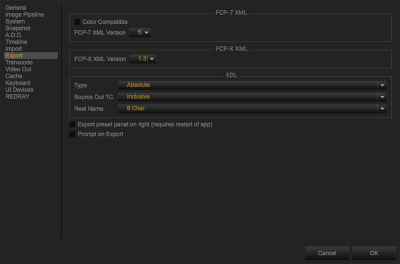
Figure: Export Preferences
Go to Preferences > Export to configure the Final Cut Pro (FCP) and edit decision list (EDL) settings when exporting:
- For FCP-7 XML, set the following items:
- Enable/Disable Color Compatible.
- Select the FCP-7 XML Version number (if applicable).
- For FCP-X XML, select the FCP-7 XML Version number (if applicable).
- For EDL, set the following items:
Type: Set to one of the following:
- Absolute
- Edge
Source OUT TC: Set to one of the following:
- Inclusive
- Exclusive
Reel Name: Set to one of the following:
- 8 Char
- 16 Char
- Enable/Disable Export preset panel on right (restart REDCINE-X PRO after changing this setting)
- Enable/Disable Prompt on Export.