System
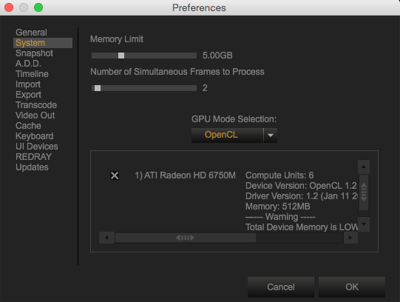
Figure: System Preferences
RED® recommends adjusting the following items to improve GPU performance. Go to Preferences > System to set the following items:
- Memory Limit: Set to half of your RAM.
- Number of Simultaneous Frames to Process: Set to the maximum number.
NOTE: Setting Number of Simultaneous Frames to Process to a value greater than the number of CPU Cores can impact system usability.
- GPU Mode Selection: Set to one of the following:
- Disable GPU
- OpenCL
- CUDA