Install the OLPF Frame
WARNING: This procedure is ONLY applicable to EPIC MYSTERIUM-X® and SCARLET® MYSTERIUM-X cameras.
WARNING: DO NOT allow any dirt or debris to enter the optical cavity.
-
Turn off the camera.
-
Remove the lens, and any modules, cables, or other accessories that might interfere with removing the lens mount.
-
Loosen and remove the four (4) M4x0.7 x 8 mm lens mount screws in a cross pattern (“X” pattern) using a T20 TORX® driver.
NOTE: Screw removal may require a large handle T20 TORX driver and additional leverage.
-
Remove the lens mount.
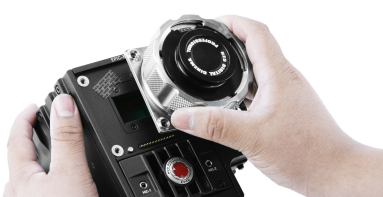
Figure: Remove Lens Mount
-
Use a damp, lint-free cloth to gently wipe down the area around the lens mount and OLPF module. Remove as much dust and debris as possible.
-
Remove the old OLPF frame.
-
Remove the tamper seals with ESD-safe plastic tweezers.
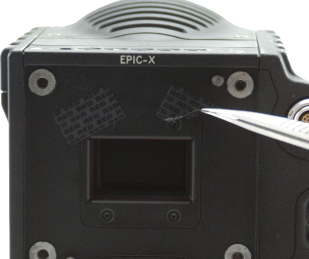
Figure: Remove Tamper Seals
-
Remove the four (4) M2x0.4 x 4 mm OLPF frame screws (P/N 600-0224) in a cross pattern (“X” pattern) using a T6 TORX driver.
-
Remove the OLPF frame with the tip of the TORX driver.
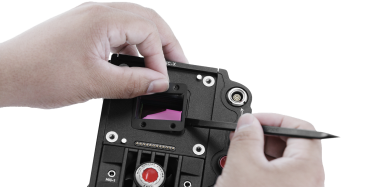
Figure: Remove the OLPF Frame
-
-
Install the new OLPF frame.
-
Insert the OLPF frame into the optical cavity with the lip on the outer rubber frame and press lightly downward to seat.
-
Insert and loosely tighten the four (4) M2x0.4 X 4 mm OLPF module screws (P/N 600-0224) in a cross pattern (“X” pattern) using a T6 TORX driver. DO NOT FULLY TIGHTEN.
-
-
Replace the lens mount.
-
Replace and loosely tighten the four (4) M4x0.7 x 8 mm lens mount screws in a cross pattern (“X” pattern) using a T20 TORX driver. DO NOT FULLY TIGHTEN.
-
Fully tighten the four (4) lens mount screws in a cross pattern (“X” pattern) using a T20 TORX driver. DO NOT exceed 350 in-oz, or damage may occur.
WARNING: DO NOT OVERTIGHTEN.
-