MOTION MOUNT Shutter Types
|
This section includes: |
Based on the selected shutter type, the MOTION MOUNT overrides control of all shutter operations. The MOTION MOUNT can operate at frame rates up to 109.98 fps.
Use the table below to help determine which MOTION MOUNT shutter type to use:
|
Shutter Type |
Rolling Shutter |
Temporal Aliasing |
|---|---|---|
|
Soft Shutter |
None |
Dramatically reduced |
|
Square Shutter |
None |
No effect |
Select MOTION MOUNT Shutter Type and Settings
- Go to Menu > Settings > Setup > Lens > Motion Mount.
- Select one of the following shutter types from the Shutter Type drop-down menu:
- Soft: For more information, go to Soft Shutter.
- Square: For more information, go to Square Shutter.
-
Select a Shutter Angle or Int. Time (Integration Time).
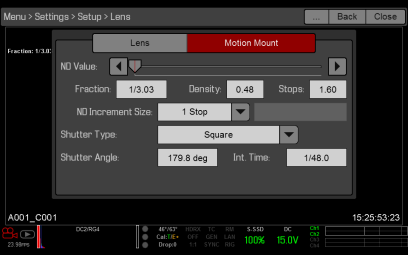
Figure: Set Up MOTION MOUNT Settings