Cannot Use Monitor Via DisplayPort or HDMI
Symptom
When you connect a monitor to the DisplayPort or HDMI connector, no image displays.
Potential Resolutions
- Open REDCINE-X PRO and go to Preferences > Video Out and ensure that you see the following options:
1920 x 1080 50 FPS
1920 x 1080 60 FPS
3840 x 2160 23.976 FPS
3840 x 2160 24 FPS
3840 x 2400 23.976 FPS
3840 x 2400 24 FPS
4096 x 2160 23.976 FPS
4096 x 2160 24 FPS
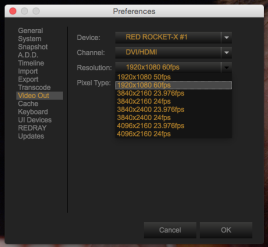
Figure: Video Out Preferences
NOTE: If you do not see these options, ensure that the most recent versions of the RED ROCKET-X Installer and REDCINE-X PRO are fully installed. If you are still experiencing issues, submit a Support ticket at https://support.red.com.
-
Set a resolution and refresh rate in REDCINE-X PRO that the monitor supports.
-
Ensure that a correct monitor input port is selected.
-
Ensure that the monitor is plugged in to the DisplayPort OUT A connector on the RED ROCKET-X.
-
If you are using a DisplayPort to HDMI cable/adaptor, try a different cable/adaptor.
-
If you are outputting to 4K, ensure that the monitor and cable are DisplayPort 1.2 or HDMI 1.4 compliant.