EPIC/SCARLET Adaptor Modules
This section describes the EPIC/SCARLET adaptor modules.
Module Adaptor
The Module Adaptor mounts to the back of the EPIC/SCARLET BRAIN and provides power and support for connected modules. The Module Adaptor includes 1/4-20 mounting holes for customized configuration support. Most EPIC/SCARLET modules require the use of an adaptor module.
WARNING: The Module Adaptor is NOT compatible with the +1 Adaptor Module.
+1 Adaptor Module
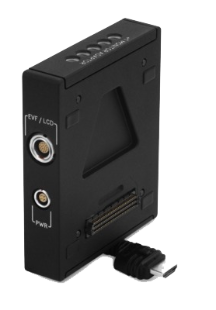
Figure: +1 Adaptor Module
The +1 Adaptor Module mounts to the back of the EPIC/SCARLET BRAIN, providing power and support for connected modules. The +1 Adaptor Module also offers a 4-pin 0B auxiliary power (DC) port for camera accessories, and an EVF/LCD port for the use of an additional viewfinder or display.
WARNING: The +1 Adaptor Module IS NOT compatible with the Module Adaptor.
WARNING: DO NOT use the EVF/LCD port on the +1 Adaptor Module if a Pro I/O Module is connected to the EPIC/SCARLET BRAIN. The Pro I/O Module overrides the EVF/LCD and AUX power out ports when connected.
WARNING: DO NOT attempt to power a third-party device without first verifying the cabling and connections are correct, since that may cause damage. Damage to the device, the module, or other components of the camera system caused by attempting to power a third-party device incorrectly may not be covered under warranty.
NOTE: The +1 Adaptor Module requires that your camera is on firmware v4.0.8 or later.
NOTE: Use a 4-Pin to 2-Pin Adaptor Cable to support 2-pin camera accessories.
+1 Adaptor Module Connections
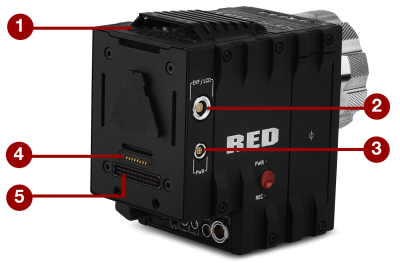
Figure: +1 Adaptor Module
|
# |
Connector |
Connector Type |
Connector Function |
|---|---|---|---|
|
1 |
Mounting |
1/4-20 mounting |
Supports bolt-on auxiliary equipment |
|
2 |
EVF/LCD1 |
N/A |
Custom digital video and power interconnection between the camera and RED EVF or LCD; Pinout not published |
|
3 |
Auxiliary power out (PWR) |
4-pin 0B |
Supplies unregulated (+) 11.5 to 17 VDC battery pass-through; Connect to 2-pin 0B accessories with RED 4-Pin to 2-Pin Adaptor Cable; Max sustained current is 2 A |
|
4 |
REDMOTE® dock connector |
8-point POGO connector |
Power and support for the REDMOTE |
|
5 |
Dock connector |
SEARAY connector |
Supports power and communication with modules |
- DO NOT use the EVF/LCD port on the +1 Adaptor Module if a Pro I/O Module is connected to the DSMC BRAIN. The Pro I/O Module overrides the EVF/LCD and AUX power out ports when connected.
NOTE: The default auxiliary power output setting is on. Use the on-screen menu to toggle this setting ON/OFF. In the menu screen, go to: Power > Power Out > +1 PWR. After a camera firmware upgrade or factory reset, the default auxiliary power output setting is turned on. Thereafter, the last power output setting is restored.
Auxiliary Power Out (PWR)
The auxiliary power output supplies unregulated +11.5 to +17 VDC battery pass-through power. The maximum sustained current draw is 2.0 A.
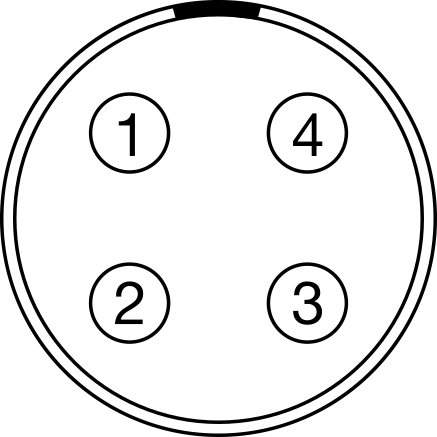
Figure: Front Face of the Power (PWR) Connector
|
4-pin 0B pwr connector |
|||
|---|---|---|---|
|
Pin |
Signal |
Description |
Direction |
|
1 |
GROUND |
Common ground |
N/A |
|
2 |
Not used |
N/A |
N/A |
|
3 |
Not used |
N/A |
N/A |
|
4 |
+11.5 to 17 VDC |
+11.5 to 17 VDC unregulated battery pass-through power |
Out |
Compatible Cables
- 790-0334: 4-Pin to 2-Pin Adaptor Cable