Backpack Quickplate (Short)
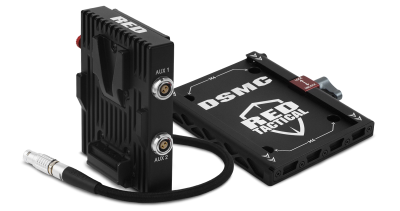
Figure: Backpack Quickplate (Short) and Backpack Base Plate
The Backpack Quickplate and Backpack Quickplate (Short) attach to the Backpack Base Plate to support a RED BRICK or REDVOLT-V. The Backpack Quickplate provides power to the DC IN rear power connector on the BRAIN using the attached 6-pin 1B cable.
The Backpack Base Plate is a receiving platform for power modules like the Backpack Quickplate and Backpack Quickplate (Short). The Backpack Base Plate attaches to the BRAIN using four (4) screws. A slide-and-lock mechanism provides easy installation and enables you to adjust the height of a Backpack Quickplate.
WARNING: DO NOT attempt to power a third-party device without first verifying the cabling and connections are correct, since that may cause damage. Damage to the device, the module, or other components of the camera system caused by attempting to power a third-party device incorrectly may not be covered under warranty.
NOTE: The Backpack Base Plate is required to mount the Backpack Quickplate or Backpack Quickplate (Short).
Backpack Quickplate Connectors
The Backpack Quickplate offers one (1) P-Tap connector that provides power (70 W max) for camera accessories.

Figure: Backpack Quickplate P-Tap Connector
|
2-pin P-TAP Connector |
|||
|---|---|---|---|
|
Pin |
Signal |
Description |
Direction |
|
1 |
GROUND |
Common ground |
N/A |
|
2 |
+11.5 to +17 VDC |
+11.5 to 17 VDC unregulated battery pass-through power |
Out |
Can Backpack Quickplate (Short) Connectors
The Backpack Quickplate (Short) offers two (2) 0B 2-pin AUX ports that provide a maximum combined output of 3.8 A.
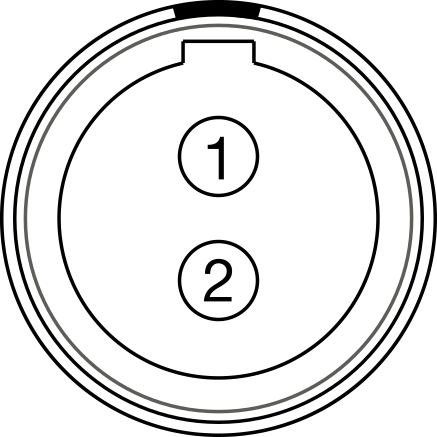
Figure: Backpack Quickplate (Short) AUX Connector
|
2-pin 0B Aux Connectors |
|||
|---|---|---|---|
|
Pin |
Signal |
Description |
Direction |
|
1 |
GROUND |
Common ground |
N/A |
|
2 |
+11.5 to +17 VDC |
+11.5 to 17 VDC unregulated battery pass-through power |
Out |
NOTE: Mating connector is EEG.0B.302.CLL.
Install Backpack Base Plate and Backpack Quickplate (Short)
REQUIRED TOOL(S): 3.0 mm Hex driver
-
Turn off the camera.
- Place the Backpack Base Plate on the rear of the BRAIN.
- Insert four (4) M4x0.7 mm x 8 mm mounting screws into the Backpack Base Plate mounting holes.
- Use a 3.0 mm Hex driver to tighten screws in a cross pattern (“X” pattern) approximately two (2) turns each.
DO NOT FULLY TIGHTEN.
-
Fully tighten the four (4) screws in a cross pattern (“X” pattern).
WARNING: DO NOT OVERTIGHTEN.
- Loosen the wingnut clamp on the Backpack Base Plate.
- Slide the Backpack Quickplate (Short), with the V-Mount receiver facing away from the BRAIN, into the dovetail rails on the Backpack Base Plate.
- Tighten the wingnut clamp on the Backpack Base Plate.
WARNING: DO NOT OVERTIGHTEN.
- Connect the 6-pin 1B connector to the DC IN port on the BRAIN.
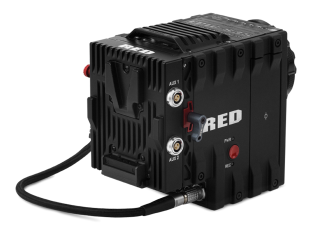
Figure: Backpack Quickplate (Short) Collection with a RED BRICK
NOTE: The release button is black on the Backpack Quickplate and red on the Backpack Quickplate (Short).
Insert a Battery
- Slide the RED BRICK or REDVOLT-V onto the back of the Backpack Quickplate so that it fits into the V-Mount on the back of the Backpack Quickplate.
- Apply pressure until the battery is fully seated.
NOTE: You may not hear a click when the battery is fully connected.
Remove a Battery
- Press the release button on the side of the Backpack Quickplate to remove the RED BRICK or REDVOLT-V.
- Pull up on the battery to disengage it from the V-mount.