Pair the T.H.C. with the R.C.P. Bridge
|
This section includes: |
You can pair the T.H.C. with the R.C.P. Bridge using either a wired or unwired connection. This section describes both methods.
Pair the T.H.C. with the R.C.P. Bridge Wirelessly
- Dock the R.C.P. Bridge Bridge to the camera.
- Power off the T.H.C. by toggling the power switch to Cable mode.
- Press and hold the Focus Limit button, and toggle the power switch to Battery mode.
The Focus and Iris LEDs alternate flashing in a ping-pong manner.
- After a few seconds, release the Focus Limit button. The Iris Limit and Focus Limit LEDs flash to tell you what the current channel is:
- Iris Limit LED: Flashes to represent the tens.
- Focus Limit LED: Flashes to represent the ones.
For example, if the Iris Limit LED flashes twice, and the Focus Limit LED then flashes once, then the channel is currently 21.
- After the LEDs stop flashing, press the Iris Limit and Focus Limit buttons to set the new channel:
- Iris Limit button: Press to set the tens.
- Focus Limit button: Press to set the ones.
For example, if you want the channel to be 14, press the Iris Limit button once, and then press the Focus Limit four times.
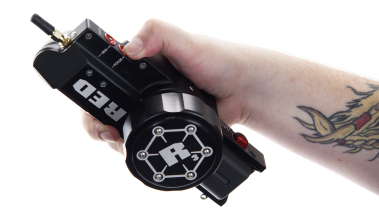
Figure: Set Channel with Limit Buttons
- Wait a few seconds, and the Iris Limit and Focus Limit LEDs flash to tell you what the new channel is.
- Power off the T.H.C. by toggling the power switch to Cable mode.
- Power on the T.H.C. by toggling the power switch to Battery mode.
The Wireless LED remains solid blue once it connects to the channel.
- In the camera menu, go to Menu > Settings > Setup > Motor Control.
- Select the Wireless tab.
- Select the Enable Wireless Controller check box.
- Select the channel from the Channel drop-down menu. The default is Channel 1, and you can select one out of 42 channels.
- Select the strength of the wireless signal from the Power drop-down menu:
- Low: The low power setting balances range and low power and is appropriate in most cases.
- High: For maximum range, the high power setting can be used.
NOTE: Be sure to set wireless signal power appropriately. If the wireless signal power is set to High, the T.H.C. may not perform as desired or may lose connection if operating in close proximity to the R.C.P. Bridge. When using the High setting, the T.H.C. should be at least one (1) meter from the R.C.P. Bridge for proper operation.
Pair the T.H.C. with the R.C.P. Bridge via a Wired Connection
- Dock the R.C.P. Bridge to the camera.
- Connect the AUX port on the T.H.C. to the AUX port on the R.C.P. Bridge using the R.C.P.-to-T.H.C. Connector Cable (3').
- Toggle the power switch to Cable mode.
The T.H.C. automatically pairs to the R.C.P. Bridge.
- Install a RED LI BATTERY 7.2V.
- Toggle the T.H.C. power switch to Battery mode.
- Remove the R.C.P.-to-T.H.C. Connector Cable (3').
The T.H.C. searches for the wireless connection. The wireless LED stops flashing and remains solid blue when connected.
- In the camera menu, go to Menu > Settings > Setup > Motor Control.
- Select the Wireless tab.
- Select the Enable Wireless Controller check box.
- Select the channel from the Channel drop-down menu. The default is Channel 1, and you can select one out of 42 channels.
- Select the strength of the wireless signal from the Power drop-down menu:
- Low: The low power setting balances range and low power and is appropriate in most cases.
- High: For maximum range, the high power setting can be used.
NOTE: Be sure to set wireless signal power appropriately. If the wireless signal power is set to High, the T.H.C. may not perform as desired or may lose connection if operating in close proximity to the R.C.P. Bridge. When using the High setting, the T.H.C. should be at least one (1) meter from the R.C.P. Bridge for proper operation.