Manage 3D LUTs
To manage 3D LUTs, go to Menu > Settings > Display > Monitor Control. 3D LUTs can be stored on the camera or transferred to SSD, so that you can build a library of 3D LUTs, or quickly copy 3D LUTs from one camera to another via SSD.
- In Camera: 3D LUTs that are saved internally on the camera.
- On Media \luts: 3D LUTs that are on the SSD.
Export and Import 3D LUTs
To export and import 3D LUTs, go to Menu > Settings > Display > Monitor Control. 3D LUTs can be stored on the camera or transferred to SSD to be shared with other cameras. When exporting 3D LUTs from camera to an SSD, the 3D LUTs are saved to a folder on the SSD called “luts”. When importing 3D LUTs from an SSD to camera, the 3D LUTs must be stored on the SSD in a folder called “luts”.
-
 : Export selected 3D LUT from camera to SSD.
 -
All
: Export all 3D LUTs from camera to SSD. -
 : Import selected 3D LUT from SSD to camera.
 -
All: Import all 3D LUTs from SSD to camera.


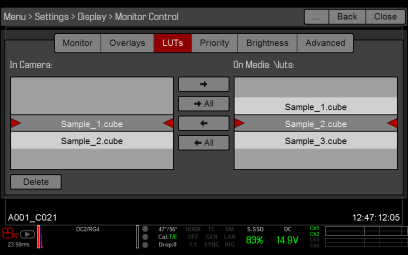
Figure: 3D LUT