Live Action Area
The Live Action Area contains the recorded image area
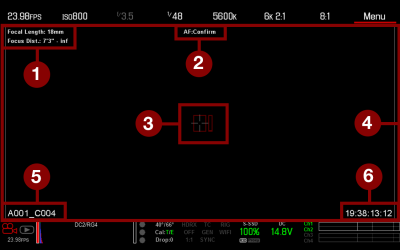
Figure: Live Action Area
The Live Action Area includes the following GUI elements:
|
# |
ITEM |
Description |
Details |
|---|---|---|---|
|
1 |
Lens Information |
Lens information when using supported Canon® lenses |
|
|
2 |
AF Status |
Currently selected auto focus mode |
|
|
3 |
Center Crosshair and Spot Focus Guide |
Crosshair: Center of selected guide Reference guides: Safe Action/Safe Title, Picture Center, Grid Overlay |
|
|
4 |
Frame Guides |
Record or sensor projection area |
|
|
5 |
Clip Filename |
Filename of the clip being recorded, or filename of the next clip to be recorded |
N/A |
|
6 |
Timecode Value |
Current timecode value |
Lens Information
This section describes the lens information displays when a supported lens is attached.
PL Lenses
Displays the focal length and focal distance when a DSMC PL mount is installed and a lens with the Cooke S4/i system (or equivalent) is attached. For more information, go to Lens Tab.
Canon and Nikon Lenses
The camera displays the focal length and focal distance when