Lower Status Row
The Lower Status Row provides access to key system information and camera values.
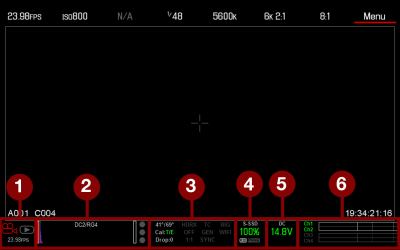
Figure: Lower Status Row
|
# |
Item |
Sub-item/Description |
Details |
|---|---|---|---|
|
1 |
Camera Mode |
Swipe up to toggle Motion/Stills/Playback modes |
|
|
2 |
Histogram |
Histogram; tap to open the Tools menu |
|
|
3 |
System Status |
Tap to open the System Status menu |
|
|
Camera sensor and core temperature |
|||
|
Cal: T/E |
|||
|
HDRX®: Displays when HDRX mode is on |
|||
|
False Color Mode: Displays modes |
|||
|
Magnify mode |
|||
|
Timecode |
|||
|
Genlock |
|||
|
Sync |
|||
|
RM |
|||
|
LAN |
|||
|
RIG: Indicates 3D rig metadata is present |
N/A |
||
|
WIFI: Indicates WiFi connection |
|||
|
4 |
Media Status |
Media location and remaining capacity |
|
|
5 |
Power Status |
DC voltage or remaining battery capacity; tap to open the Power menu |
|
|
6 |
Audio Meter |
Audio input and volume; tap to open the Audio menu |