Calibration Map Naming Conventions
All calibration maps for Low Light Sensor Sensitivity are marked with the "LL" symbol.
Each calibration map has a unique name that uses the format described in the table below:
|
Name |
Description |
Example |
|---|---|---|
|
Exposure |
Current exposure; to set exposure, go to Exposure/Shutter If the calibration map was created using Auto Calibration, then "auto" displays instead of an exposure setting |
48 auto |
|
Sensor Temperature |
Sensor temperature (Celsius); in the Lower Status Row, this is the number to the left of the forward slash (Temp: 32/35) |
32C |
|
Year |
Year that the calibration map is created (yyyy) |
2014 |
|
Month |
Month that the calibration map is created (mm) |
01 |
|
Day |
Day that the calibration map is created (dd) |
28 |
|
Time |
Time according to the 24-hour clock in the camera (hhmmss) |
122150 |
|
Letters |
Two random alphanumeric characters generated by the camera to prevent any possibility of duplicate names being created |
LQ |
|
Low Light Indicator |
All calibration maps for Low Light Sensor Sensitivity have the suffix "_LL" |
LL |
For example, a set of calibration maps may look like this:
- 48_39C_20000115AT
- 48_39C_20000115ID_LL
- auto_40C_20000108NU
- 48_38C_200001257A_LL
NOTE: If you mount an SSD with calibration files to your computer, each calibration map displays as a sub-folder in a folder called Calibration. To save a calibration map to your hard drive, copy the entire sub-folder to your drive.
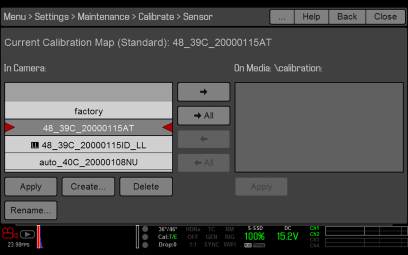
Figure: Sensor Calibration Menu